
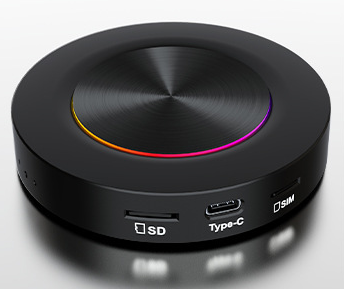
Wireless Apple CarPlay is a technology that connects an iPhone device wirelessly to an infotainment system in a car. This connection does not need to use any data cable, users can directly through Bluetooth or Wi-Fi wireless CarPlay function.
To set up wireless CarPlay, you need to do some configuration on the iPhone. The steps are as follows:
Open the settings screen on your phone.
Select the generic option.
Click on the“Carplay Car” feature.
In the pop-up screen, select“Available cars” and then select your vehicle.
In addition, if your vehicle supports a Wi-Fi connection, you may need to enter a Wi-Fi password to complete the connection. If your vehicle does not support Wireless CarPlay, consider purchasing a third-party Wireless CarPlay adapter such as CarlinKit 3.0 or AutoSky Wireless Apple CarPlay and Android Auto Adapters, these adapters can help you connect your phone wirelessly to the in-car system.
It’s worth noting that while many new models support wireless CarPlay, Apple doesn’t provide a detailed list of support, so you’ll need to know in advance if you’re buying a car that supports wireless CarPlay.
All in all, wireless CarPlay is a much more convenient and secure experience for drivers, and you can easily enjoy the convenience of wireless connectivity as long as you make sure your vehicle and devices support it.
What’s the latest in wireless Apple Carplay?
The latest developments in wireless Apple CarPlay technology focus on the following areas:
Wireless connectivity: Wireless Apple CarPlay via Wi-Fi and Bluetooth connectivity. The first step is to manually connect to Bluetooth. After the connection is successful, the system will automatically connect to Wi-Fi, complete the relevant handshake authentication, and eventually the Bluetooth will automatically disconnect.
Smart cockpit integration: Xiaomi’s SU7 has an OTA update that adds wireless Apple CarPlay capabilities, allowing users to control the CarPlay interface with a Siri voice assistant.
Next-generation CarPlay 2.0: according to iOS 17.4 Beta, Apple CarPlay will launch its next-generation product, CarPlay 2.0, in the 2024. This new version will debut in Porsche and other models, and will be more deeply integrated with the vehicle’s dashboard, climate control, FM radio, and so on.
User Experience Optimisation: the next generation of CarPlay will introduce new applications, ‘goodbye’ screens and a wealth of colour choices, allowing users to adjust themes and colour schemes, including the appearance of the dashboard.
Which models currently support wireless Apple Carplay?
Current models that support wireless Apple CarPlay include the following:
Audi brand:
Audi A6
Audi a 7
Audi a 8
Audi Q 8
BMW brand:
BMW 2 series
BMW 3 Series
BMW 4 series
BMW 5 Series plug-in hybrid (530e)
BMW X 1
BMW 3 Series
BMW 5 Series
BMW 6 Series
The 2021 BMW 5 Series
Mercedes-benz brand:
Mercedes a class
Mercedes c-class
Mercedes e-class
Mercedes s-class
Mercedes-benz GLE
Mercedes-benz GLS
In addition, Apple introduced a new version of the CarPlay experience at the end of the 2023, with at least 14 manufacturers making the first cars to support the experience, although the exact models are not yet available, but these brands include Mercedes-benz, Audi, Porsche, Honda and so on.
What is the compatibility and performance of third-party Wireless CarPlay adapters such as CarlinKit 3.0 or AutoSky Wireless Apple Carplay?
Third-party Wireless CarPlay adapters, such as CarlinKit 3.0 and AutoSky Wireless Apple Carplay, have high compatibility and good performance.
The CARLINKIT 3.0 adapter supports zero vehicles and mobile phones and automatically wirelessly connects to CarPlay without the need for a USB cable. It works on all models from iPhone 6 to iPhone 13pro Max (running iOS 10 through 15) . In addition, CarlinKit 3.0 offers life-long technical support and free updates. User feedback shows that the initial setup for CarlinKit 3.0 is fast and takes about 10 to 20 seconds to complete the pairing.
On the other hand, the AutoSky Wireless CarPlay adapter also performs well. It’s compatible with most cars with built-in Android Auto or Apple CarPlay features, and works with iOS and Android devices, making it a versatile option. The adapter is compact and lightweight, does not interfere with interior space, and supports voice commands, allowing the user to control the CarPlay function without leaving the steering wheel. User experience shows that the AutoSky adapter is easy to install and use.
In summary, both CarlinKit 3.0 and AutoSky Wireless Apple CarPlay adapters are highly compatible and perform well for most users.
How to solve the problem of unstable wireless CarPlay connection?
There are several ways to solve the problem of unstable wireless CarPlay connections:
Check the iOS version: Make sure your iPhone is up to date with the latest iOS version. Outdated iOS versions can cause CarPlay connection problems. You can go to settings > general > software updates on your iPhone to view and install any updates that are available.
Reboot the device: reboot the iPhone and the car’s systems, then disconnect all cables and reconnect. This ensures that all processes are shut down, including those that may have problems.
Enable Bluetooth: make sure your iPhone and car have Bluetooth enabled. On the iPhone, open the settings application and click Bluetooth to make sure the Bluetooth switch is turned on. Also, in your car, find the Bluetooth settings and make sure that Bluetooth is enabled.
Use Wired CarPlay as a temporary solution: if your wireless CarPlay connection is not stable, Try Wired Carplay first. If the cable CarPlay works, then you try to use the wireless connection, part of the engine this can solve the problem.
Check your car for support: Make sure your car supports CarPlay and your WiFi is working properly. Some vehicles may require a specific configuration to use wireless CarPlay.
Ignore the car and reconnect: on the iPhone, disconnect Carplay from the car and search and connect again. This helps reset the connection.
Use Carplay boxes: If you’re using wired Carplay, consider using the Carlinkit Carplay box to easily convert wired Carplay to wireless Carplay. These boxes usually provide a more stable connection.
Through the above methods, you should be able to effectively solve the wireless CarPlay connection instability problem.
What are the specific requirements or limitations of wireless CarPlay for vehicles and mobile phone systems?
Wireless CarPlay has some specific requirements or restrictions on vehicle and mobile phone systems, including the following:
Vehicle certification: vehicles must support Apple’s certification program. This means the vehicle will need to go through Apple’s certification process to ensure its hardware and software are compatible with CarPlay.
USB port: the vehicle must be equipped with a USB port that conforms to Apple standards. These USB ports need to be able to handle data transfers and may require a specific interface type, such as Lightning or Type-C.
Accessories compatibility: Carplay Accessories 3.0 using the Apple certified coprocessor can only be declared compatible with iOS 10.3 or later. This means that the car’s CarPlay system needs to be able to identify and use these accessories.
Data line and chip authentication: in some cases, the use of non-original data line may lead to unrecognized or unable to use the CarPlay function properly. This is because non-native data lines may not be certified by Apple’s chips.
External Box: some models can be installed by external box to achieve wireless CarPlay function. This approach usually requires additional hardware devices, such as the DongleLink box, and requires specific steps to install.
System Integration: implementing CarPlay requires integration of hardware and software, which means that simply installing software is not enough. The original CarPlay features are usually best for connectivity and stability because they have been fully certified by Apple.
Wireless CarPlay has strict requirements for vehicle and mobile phone systems, involving hardware, software certification and accessories compatibility.